
Standing Documents and Delete Nil Lines
Standing Documents provide a simple and flexible way to manage recurring transactions in Accredo. They are available in JC transaction batches, GL transaction batches, AP shipments, Invoices, Sales Orders, and Purchase Orders.
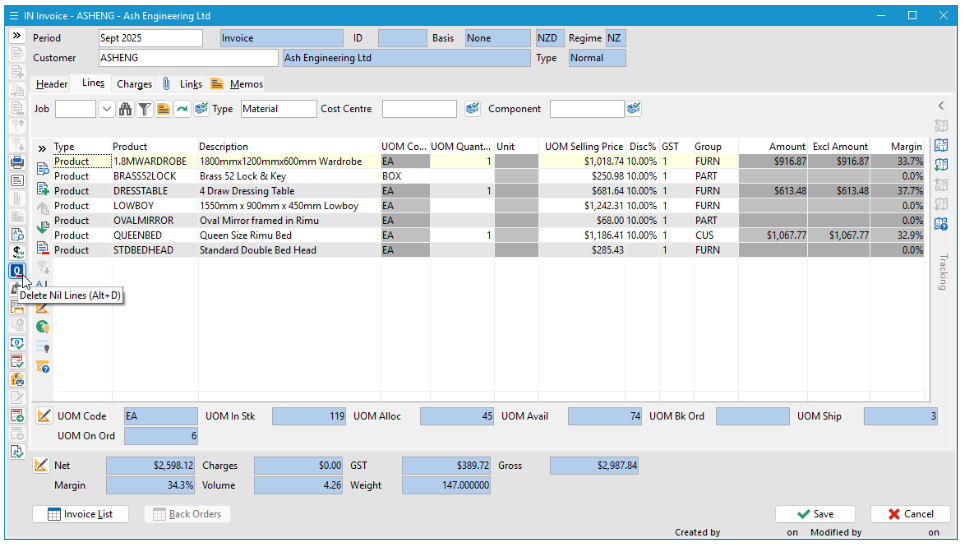
Standing Documents provide a simple and flexible way to manage recurring transactions in Accredo. They are available in JC transaction batches, GL transaction batches, AP shipments, Invoices, Sales Orders, and Purchase Orders.
Standing documents act as templates, allowing you to include all products, services, or charges that may be required. When a standing document is duplicated, you enter quantities or values only for the lines that actually apply to that period or transaction.
The Delete Nil Lines button completes this workflow. Available while editing, it removes all lines where the quantity, extended cost, and extended amount are zero. This includes lines that contain only a description. With a single click, all unused lines from the standing document are removed.
Why this is useful
- Enables flexible templates without extra cleanup
- Speeds up recurring transaction entry
- Ensures transactions clearly reflect what was actually supplied
Using Standing Documents together with Delete Nil Lines is a simple, efficient way to streamline recurring work while keeping transactions accurate and easy to review.
« Back to articles
