
Renaming Address Fields
Did you know you can rename the Address fields and Delivery Address fields on Customers and Creditors? Custom labels let you tailor the interface to match your business terminology.
How to do it
- Open Display Labels settings
Go to Navigator > Setup > Company > Configuration > Settings > Display Labels Tab. - Click Edit (F11)
Enter the description you would like to use for each address field. - Click Save (F9)
Your new labels are saved and applied immediately.
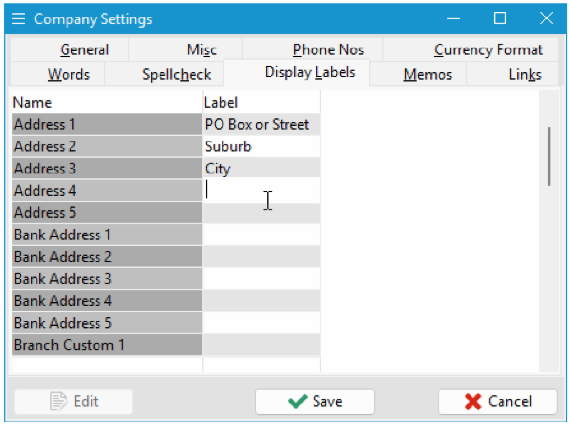
Display Labels Tab.
Result
When you open a Customer or Creditor record, the Address Name fields will now display using your custom labels.
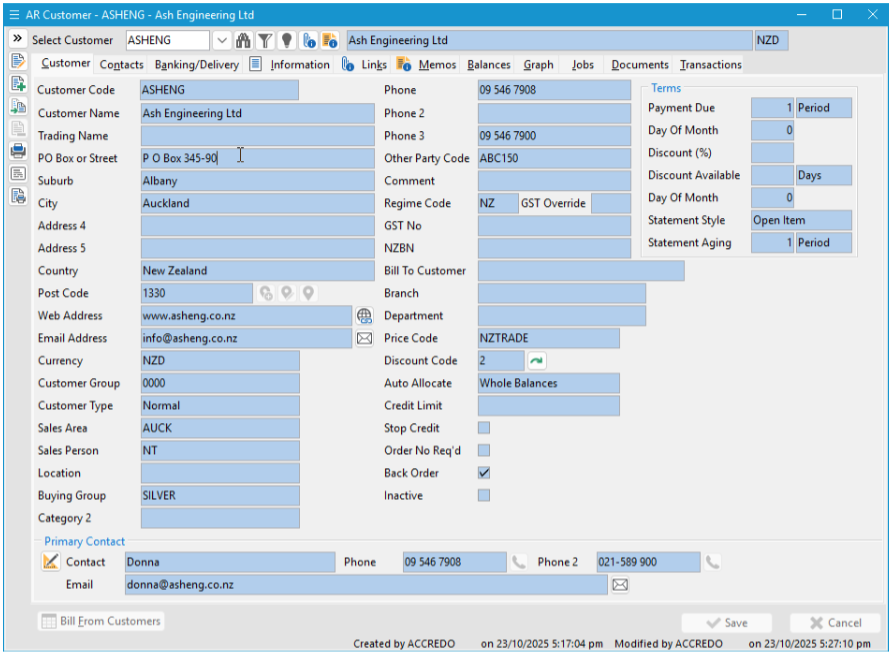
Customer or Creditor record,
Why this helps
Renaming address fields means your team sees familiar, business-specific terminology rather than generic labels — reducing confusion and making data entry faster and more consistent.
« Back to articles
