
Print Log
Track and Review Document Printing Activity with Ease
The Print Log provides visibility into when documents are printed, by whom, and which documents were involved. This feature supports audit requirements, enhances traceability, and assists with troubleshooting printing-related issues.
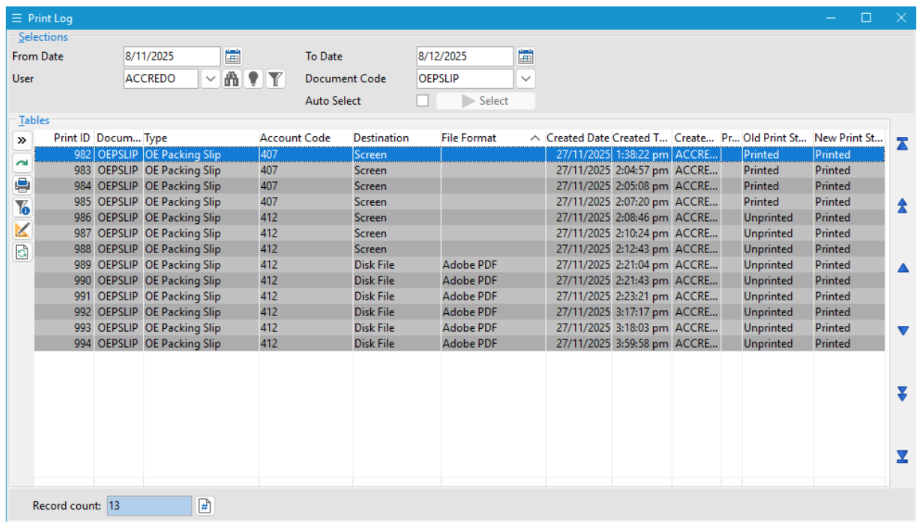
The Print Log can be accessed via:
Navigator > Setup > Company > Print Log
It can also be opened directly from a logged document using OpenLog.
Users require Read access to Company > Settings to view the Print Log.
What Is the Print Log?
The Print Log displays a historical record of printing activity for documents configured to be
logged in Document Defaults.
This allows organisations to monitor print usage, verify that critical business documents have
been generated, and investigate discrepancies when needed.
The log can be filtered by date, user, and document type to quickly locate the information
relevant to the user’s query or audit process.
Print Log Selection Options
From – To Date
Allows users to specify a date range for the log entries.
• Leaving the fields blank displays all log entries.
• By default, the log shows changes made within the last month based on the machine
date.
User
Enables filtering by a specific user, making it easy to see documents printed by that individual.
Document Code
Allows selection of a specific Document Code, narrowing the log to only those documents.
Auto Select Behaviour
Auto Select – Enabled
Selections, filters, and sorting options are applied immediately as they are changed. This
provides real-time updates to the log list without needing to manually refresh.
Auto Select – Cleared
Selections do not automatically apply. Users must manually confirm their filters.
The default setting for Auto Select is controlled in Company Settings.
Select (F9)
Clicking Select (or pressing F9) applies all chosen filters, selections, and sorting options to
refresh the log.
This action is required when Auto Select is turned off.
« Back to articles
