
One-Time Password (OTP)
Adding Multi-Factor Authentication to Accredo Logins
What is One-Time Password (OTP) login in Accredo?
One-Time Password (OTP) is a built-in multi-factor authentication (MFA) feature in Accredo that requires a time-based code from an authenticator app in addition to a user's regular password when logging in. It applies to Windows Client logins and can be configured independently for each Web Service Client, so you can require it for the whole team or roll it out gradually, and exempt specific accounts where it isn't practical.
How to turn it on
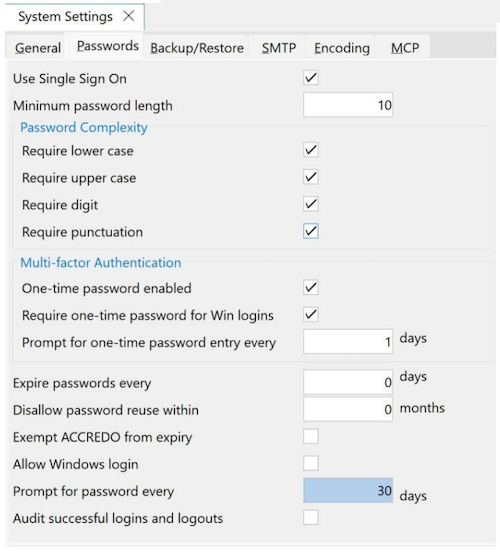
Go to Accredo > File > System > Settings > Passwords tab. Under Multi-factor Authentication:
- Select One-time password enabled to allow users to be enrolled for OTP.
- Select Require one-time password for Win logins to enforce it for Windows Client logins, unless a user is exempted (see below). Web Client OTP requirements are set per Client instead.
- Set Prompt for one-time password entry every ... days to control how often users are re-prompted. 0 means OTP is required on every login.
Setting it up per user
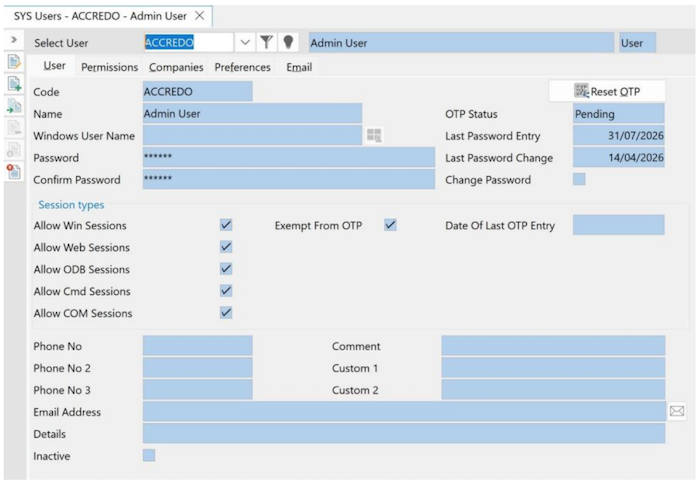
- In Accredo > File > System > Users, each System User has an OTP Status: None, Pending (enabled, will enrol at next login), or Enrolled.
- Select Exempt from OTP for any user who should skip it, such as a service account used for scheduled tasks.
- Use Reset OTP at any time to set a user's status back to Pending and force re-enrolment, for
example if they lose their device.
What the user sees
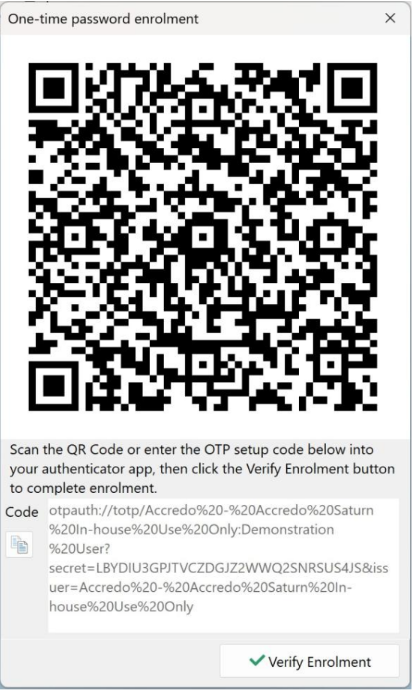
- A user with Pending status is prompted to enrol for OTP the next time they log in. A One-time password enrolment dialog appears with a QR code (and a copyable setup code) to scan into an authenticator app, such as Google Authenticator or Microsoft Authenticator, then Verify Enrolment to complete the setup.
- Once enrolled, they'll only be asked for a code again based on the frequency you've set, and the Date of Last OTP Entry recorded against their user record, so it isn't necessarily required on every single login.
- The same idea applies to apps and integrations connecting via Web Service, configured independently per Client under File > Web Service > Clients (OTP Enabled, OTP Prompt Interval).
Why it matters
Passwords alone are increasingly easy to compromise, through phishing, reuse across sites, or data breaches.
Requiring a one-time password means a stolen or guessed password isn't enough on its own to get into Accredo. Because OTP is configured per user and per Web Client, you can turn it on for the whole team at once or phase it in, and exempt specific accounts, such as those used for automation, where it isn't practical.
« Back to articles
