
Editing AP Invoice Due Dates After Posting
You can update the due date on a posted AP invoice without duplicating, contra-ing out, or re-entering anything, as long as the invoice isn’t fully allocated.
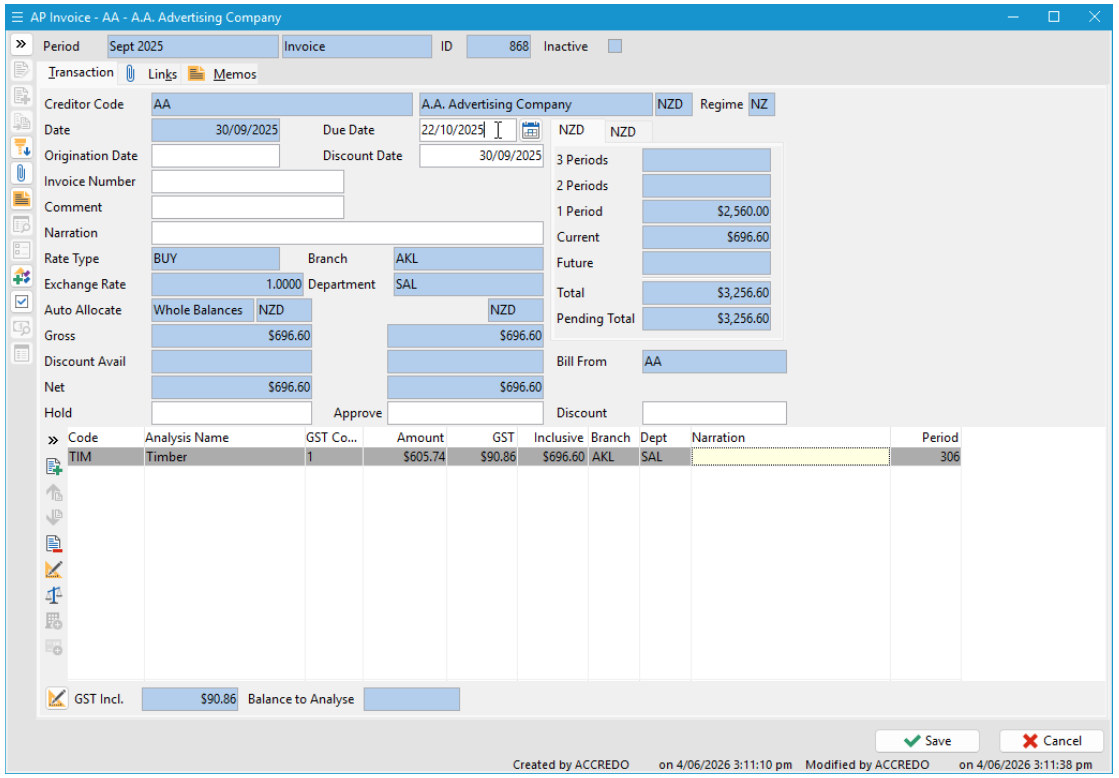
How to do it
1. Open the AP Invoice Transaction (not the Shipment)
Due dates are editable on the AP Invoice Transaction record, not the AP Shipment Document - make sure you’re in the right place.
2. Use Drill Up from the Shipment Form
If you’re on a Shipment Form, there’s a Drill Up button on the toolbar that takes you directly to the linked Invoice Transaction.
3. Or navigate via the Creditor Transactions tab
Locate the transaction in the Creditor Transactions tab and use Open Details to open it directly.
4. Edit the due date
Once in the Invoice Transaction, update the due date to align with your supplier statement with no impact to account allocations.
Important
The due date can only be edited while the invoice is not fully allocated. Once fully allocated, the field is locked. Editing is also possible at the data level if you’re using scripting.
Why this helps
This is especially useful for shipment invoices, where it’s easy to miss that the Drill Up button exists. Rather than duplicating transactions or contra-ing out, a simple due date edit keeps your records clean and aligned to supplier statements.
« Back to articles
